Desert Online General Trading LLC
Dubai, United Arab Emirates
Desert Online General Trading LLC
Dubai, United Arab Emirates


🚀 Power your future with the NanoPC-T4 — where AI meets speed and style!
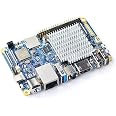
The NanoPC-T4 is a compact, high-performance ARM single board computer powered by a 2.0 GHz RK3399 hexa-core processor and 4GB LPDDR3 RAM. Designed for AI, machine learning, VR, and IoT applications, it features dual 4K display outputs, dual camera inputs, gigabit Ethernet, dual-band WiFi, Bluetooth 4.1, and versatile USB 3.0 and Type-C ports. Its 40-pin Raspberry Pi compatible GPIO header enables extensive hardware customization, making it the ultimate platform for professionals pushing the boundaries of embedded computing.
| Brand | FriendlyElec |
| Product Dimensions | 8.38 x 0.99 x 6.35 cm; 349.27 g |
| Item model number | NanoPC-T4 |
| Manufacturer | FriendlyElec |
| Colour | 4G LPDDR3 RAM |
| Processor Brand | ARM |
| Processor Speed | 2 GHz |
| Processor Socket | RK3399 |
| Processor Count | 6 |
| RAM Size | 4 GB |
| Memory Technology | LPDDR3 |
| Computer Memory Type | DDR SDRAM |
| Maximum Memory Supported | 16 GB |
| Memory Clock Speed | 2133 MHz |
| Graphics Coprocessor | Mali-T864 GPU |
| Graphics Chipset Brand | Intel |
| Graphics Card Description | RK3399 |
| Graphics RAM Type | DDR DRAM |
| Graphics Card Ram Size | 4 GB |
| Graphics Card Interface | Integrated |
| Connectivity Type | Bluetooth |
| Wireless Type | 802.11a/b/g/n/ac |
| Number of HDMI Ports | 1 |
| Number of Ethernet Ports | 1 |
| Voltage | 12 Volts |
| Power Source | DC |
| Hardware Platform | Linux |
| Operating System | Android, Linux |
| Are Batteries Included | No |
| Lithium Battery Voltage | 12 Volts |
| Item Weight | 349 g |
| Guaranteed software updates until | unknown |
J**S
Still learning and testing
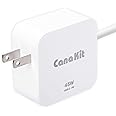
Arrived as expected, a bit difficult to open the box.Description is unclear as to content, I was happy to see it came with a really smart looking case, heat sink , 2 antennas and power supply , now whilst the power supply is international voltage its as we would call USA socket connectors.Its a really nice bit of kit Im writing this on the Lubunto that I downloaded and flashed from the website. Iv been having a few issues in adding and or updating software so I will probably look outwith supplier for a stable operating system.I can say its easy to work and as I call it play with... when you want to re flash the SYSTEM burn your iso in etcher for linux, Rufus for Windows and Unetbootin.Insert your SD card press the power and Boot button at the same time hold boot button exactly 5 seconds..... I made many mistakes here.. 5 seconds almost exact or go no where.Its certainly a good cheap home pc well Im talking Linux but will try windows.
Trustpilot
2 months ago
3 weeks ago