We remain fully operational. Our teams are working around the clock to ensure your deliveries continue safely.

DOWNLOAD THE APP


Copyright © 2025 Desertcart Holdings Limited
DOWNLOAD THE APP



🎥 Elevate your virtual presence—because your image deserves the spotlight!
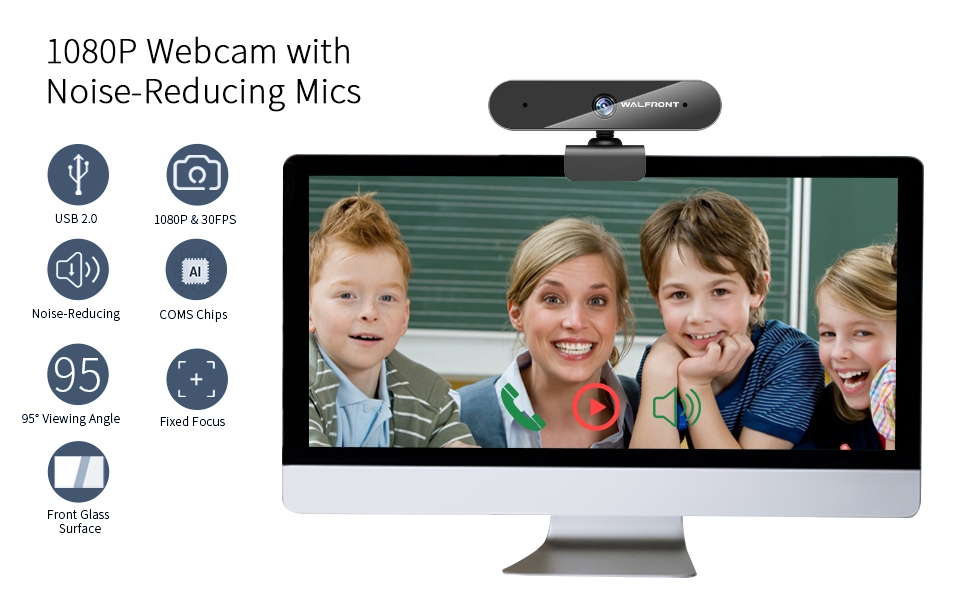
The Walfront 1080P Webcam (Model-S3) delivers professional-grade video quality with 1080p resolution at 30fps, enhanced by a 360-degree rotating base and autofocus for perfect framing. Compatible with Windows and Mac via USB plug-and-play, it features dual noise-cancelling microphones for crystal-clear audio up to 32 feet, making it ideal for streaming, conferencing, and recording with effortless setup.


| ASIN | B088CQWPY1 |
| Antenna Location | video calling, recording, conferencing, live streaming |
| Are Batteries Included | No |
| Brand | BENEWY |
| Built-In Media | 1 pcs |
| Camcorder Type | Video Camera |
| Color | Premium black |
| Compatible Devices | Personal Computer, Laptop, Tablet |
| Connectivity Technology | USB |
| Customer Reviews | 4.1 4.1 out of 5 stars (10,036) |
| Display Resolution Maximum | FHD |
| Effective Still Resolution | 2 MP |
| Effective Video Resolution | 1080 Pixels |
| Exposure Control Type | Automatic |
| Features | Low Light |
| File Format | JPEG |
| Flash Memory Type | Memory Stick |
| Focus Type | Auto Focus |
| Form Factor | Compact |
| Has Image Stabilization | No |
| Image Aspect Ratio | 16:9 |
| Image Capture Speed | 30 fps |
| Image stabilization | False |
| Item Weight | 7.8 Ounces |
| Lens Type | Wide Angle |
| Manufacturer | Walfront |
| Maximum Focal Length | 12 Millimeters |
| Minimum Focal Length | 12 Millimeters |
| Model Name | Model-S |
| Model Number | Model-S3 |
| Operating System | Windows, Mac OS |
| Screen Size | 2.8 Inches |
| Sensor Type | CMOS |
| Supported Audio Format | AAC, MP3 |
| Supported Image Format | JPEG |
| UPC | 784529027150 793481412461 |
| Video Capture Format | XAVC |
| Video Resolution | 1080p |
| Warranty Description | 1 year |
| Water Resistance Level | Waterproof |
| White Balance Settings | Auto |
T**R
Good cam, and easy to use and set up for the "technologically challenged!" :)
Found out I'm going to be teaching online, and my old Windows desktop didn't have a camera or a microphone -- I've never needed one before -- so, on the recommendation of some other teachers, I picked the Walfront. It's good.!Most importantly, for "technologically challenged" people like me who are afraid of new things (and especially new digital things), it's really easy to set up and use. The second you place the camera on your monitor and plug the USB into your tower, it's ready to go. Initially, I was freaked out, because I went into "My Computer" and "My Devices" in Windows, and it didn't show that the camera was attached. So this is what you do: Go into Zoom (easy to download) and arrange to make a Zoom call with somebody. The second you go into the Zoom meeting, the Walfront camera and microphone will turn on immediately. (In other words, there's nothing on the camera that you need to turn on or off. It does it itself.) So it's easy to set up and easy to use. I don't have any other webcams to compare it to, but it seems like it works just as better as the more expensive brands. I like it!
D**W
For the price, this is a great webcam for business meeting
Since the world went pretty much virtual after the pandemic hit, I really needed a good webcam that was inexpensive, good video and audio quality. When I first came across this webcam, I though that this probably wouldn't be a good webcam due to the fact it was priced on the low end. But I though what the heck, for the price I will give it a shot. Well I must say I am so glad I made this purchase! For me it was just plug in and go! No real set-up required. I have used this webcam on different virtual meeting platforms such as Skype, Teams, Zoom, and may more. I found the picture quality perfect for my meeting needs. I have not had any issues whatsoever with the audio as well. The little privacy cover that comes with it is very nice. So if you want an inexpensive webcam for your business needs, I highly recommend this product.
T**S
Great price & okay video, but poor audio quality
I choose this camera because it was the cheapest one I found with good reviews. The video quality is okay (grainy images) and the wide angle is nice. The privacy cover is a snap on (no adhesive tape needed) that flips down to conceal the lens which is great! There’s an adjustable monitor clip that isn’t meant to secure it tightly, but more of a way to gently hold it in place during use. The downside is that the audio quality is terrible and that’s a big problem. I tested this on 2 different a laptops with an external monitor, and a wired headset with a mic. The mic volume was set to maximum. The results were the same. The webcam mic is the clearest with the webcam less than 1 foot in front of you, but it’s still not very clear and from that distance it isn’t useful for video. If you use it on the monitor, as I assume most of us would, then your voice will be low and muffled. The only way to use the webcam on the monitor is to add an external microphone. The wired headset mic I used sounded as clear as the laptop mics. I plan on keeping the webcam because I didn’t want to have to gamble with finding another affordable webcam or even an expensive one that might end up with the same issue. The video quality is decent enough, so I just ordered an external microphone instead. Let’s see how that turns out. I still gave the product 4 stars because of the great price, decent video quality, neat privacy cover and fast shipping. I would only recommend this webcam to people if they won’t be talking on their meetings or online classes; and if they do have to speak then they don’t mind or prefer using a headset with a mic.
K**B
Works great
The picture is very clear and it was a breeze to install. Smaller than what I expected but still like it. The thing I would like to mention is that if you use zoom and have a promethean board, you might get an error stating failed to start video camera. I have found a solution to this problem that worked for me, so if an error occurs such as the one I mentioned above then try the following: Turn on the panel (zoom) prior to plugging in the webcam and wait until the meeting is up and running, then plug it in, it should work.
Trustpilot
3 weeks ago
2 months ago