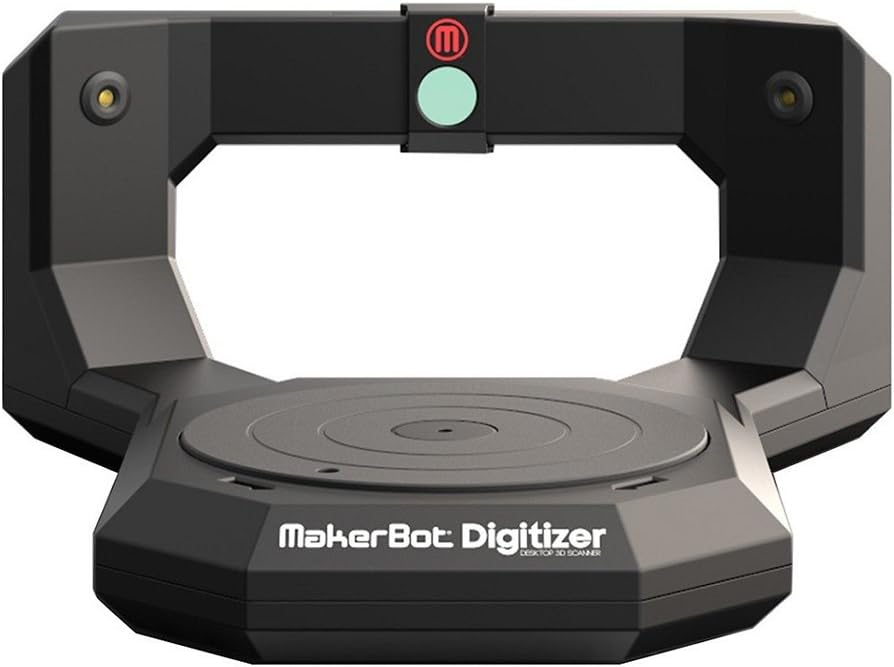

MakerBot Digitizer Desktop 3D Scanner
Product ID: 1667331
Details
- Scanner TypeDocument
- BrandMakerBot
- Model NameDigitizer
- Connectivity TechnologyUSB
- Resolution50.8 dpi
- Item Weight2.1 Kilograms
📦3 kg capacity
⏱️12 min scan time
⚙️8" diameter
🚀 Unleash Your Creativity with Every Scan!
The MakerBot Digitizer Desktop 3D Scanner allows you to quickly and easily turn real-world objects into 3D models. With a scanning capacity of up to 8 inches in diameter and 8 inches tall, it can handle items weighing up to 3 kg. The included MakerWare software simplifies the modeling process, enabling you to create high-quality, watertight models in just two clicks, all within a speedy 12-minute scan time.
| ASIN | B00FOUCBOO |
| Brand | MakerBot |
| Connection Type | USB |
| Connectivity Technology | USB |
| Customer Reviews | 2.7 out of 5 stars 23 Reviews |
| Global Trade Identification Number | 00705422933164 |
| Item Weight | 2.1 Kilograms |
| Manufacturer | MakerBot |
| Minimum System Requirements | Windows 7 |
| Model Name | Digitizer |
| Optical Sensor Technology | CMOS |
| Resolution | 50.8 dpi |
| Scanner Type | Document |
| Standard Sheet Capacity | 1 |
| UPC | 872182775782 817913010961 779177631392 779177631408 705422933164 |
| Unit Count | 1 Count |
J**.
makerware is only out for money. they dont care about the people using their equipment.
I super stoked to get this item. however, when it arrived I began having problems with it immediately. I would attempt a scan, but with 3 minutes left in the scan, my read points would disappear, then the scan would say it finished, but could not see it. so, I tried to contact makerware. that's when I found out that just to talk to makerware, it would cost $100.00. I was worried about buying a makerware product because makerware has decided to make everything propriatairy, including their filament. should have trusted my instincts and went somewhere else, but fell for the "ohhh, shiny" aspects of makerware. find a better scanner, or pay way to much to maintain this one. don't believe me? go to makerwares website and attempt to talk to them. it will cost you dearly.
U**N
NO SHARP ANGLES but works okay for gnomes, pot belly pigs, coffee cups if they are white and in perfect lighting.
As a product design engineer I did all I could to try to get this scanner to work as I desperately wanted it to help me save hours of work and also having to rely on the help of others (or lack of) to provide 3D print files. I have to say that I am terribly disappointed with this scanner. Out of the box, and with poor result after poor result, and of course, thinking it was me, I spent so many hours testing all kinds of lighting scenarios even configuring lighting arrays and racks of LED 256 capable programmable lighting, The R&D lab has 12 florescent, 4 bulb fixtures, all mounted above and controlled by 4 circuits for perfect light control. Tried several color backgrounds, distances and angles. Used all the different software settings for light, medium, dark scanning, tried lighting from below, 3 sides above and absolutely NOTHING WORKED! All scans looked like they were melted. We emailed tech that the mesh looked good while scanning, and it looked good while forming and we all tought "hey it looks good" , but then the final result looked like garbage, just blobs and globs in ridiculous areas around the object. If only I read a review like this one before I purchased I could have saved almost a full week of my precious time trying to get just ONE USABLE SCAN. And please do not think that I exaggerate. I have not sent one usable scan to my printers! As you will see below, Makerbot is working on improving the unit but here is the bottom line for this scanner "at this point in time"... It works well for gnomes, pot belly pigs, and coffee cups. (if they are all white and in PERFECT LIGHT!) and if you multi-scan them and are wiling to learn how to fix all the "noise" using a program like MESHMIXER it is a good purchase and that is why I gave it 3 stars. For what I needed it for I would not even give it a single star but I thought that doing that would not be fair. Also know too, that this device consists of just 4 basic parts: 2 simple lasers, a webcam of questionable quality, and a motorized turntable. Other than the software, that's all there is too it. Above all I really want to help anyone like me who has hopes of scanning their project for easy printing on their 3D printer. The Digitizer Ad has many examples of scanned items and says: "With just two clicks, the MakerBot Digitizer Desktop 3D Scanner’s easy to use, yet sophisticated software creates clean, watertight 3D models that are ready to 3D print. We’ve optimized the whole process to work seamlessly with MakerBot Replicator Desktop 3D Printers, but you get standard design files to use on the 3D printer of your choice. You don’t need any design or 3D modeling skills to get started, and it all happens in just minutes." Notice it mentions "clean...models" and "don't need any design or 3D modeling skills to get started". Almost 100 scans and not one was "clean" So, this leads to my main dilemma, do not expect to scan an object with a 90 degree angle. If you look at all the "examples" promoting the digitizer, the scanned subject is usually fairly large, bulbous, and not very detailed. So another major point, the smaller the item scanned the less accurate will be the results. If you already own one and are wondering why it isn't working very well, don't do like I did and think that I had to talk to tech support before realigning the lasers like the owners manual suggests. Just run the test from the menu. Mine were way out of whack. They tell you to reset the lasers if you even move the machine. Mine came UPS so I'm sure it was "jarfully" treated. Also realize that the lasers are suspended in the frame by just a rubber grommet so you can do more tweaking with your fingers moving the grommets than using the screws that are on the backside. So, after hours with tech support and 17 emails the last email on 12/20/2013 10:34 AM that I asked them was (unedited): "Haven't heard back since yesterday but in the meantime I have come to realize, after I was asked to provide a scan of a white cup, that all the examples of scans I see in the advertisements are all based on typically round and bulbous items. I needed this for a project that requires a sharp rectangle portion along with a rounded section. It seems that this current version of the Digitizer may not be able to provide a suitable scan. Could this be the case? " Their response 12/20/2013 11:01 AM, and this is also an unedited quote: "The Digitizer does have difficulties scanning sharp rectangular shapes. This is something that we are working on updating through updates to MakerWare as software is critical in getting the best possible scans. I would advise for some of these scans to import them into a program called mesh mixer ([...] to be able to clean the file up and make is sharp." I gave it a 3 star rating because I realize it can do the big rounded scans and it is sort of cutting edge stuff and as a product design engineer myself I was once told after not shipping product on schedule because of making constant revisions, "you engineers will engineer something to a standstill". But, needless to say I'm officially done trying and tomorrow I'm going to see about sending this unit back to Amazon. I was really looking to this scanner as a way to make my own printer files and print them on my Makerbot 2 and FlashForge Dual printer. Even though I was terribly disappointed with the scanner, I will be writing my review of the FlashForge 3D printer with dual extruder soon...
J**R
it seems to work great..
it seems to work great.....then its renders the points in a very odd way and for some reason i cant seem to understand you cant pull the model in to any actual workable reliable program that the ,manufacturing industry uses,
M**Y
Sadly disappointed
I played with this thing for six weeks and never got it to work. Tech support was worthless, they simply told me to do the things I already had tried (reinstall the software, for example). For that matter, the software seems to be an afterthought added to the MakerBot printer stuff. For the most part they want you to make an account and come play in their sandbox. I am disappointed, Maker has a very good reputation and this does not do justice to the company.
K**K
It Works!
With in a short time after opening the box, I made my first good scan. The key for a good scan is to have a non-reflective surface!! A few days before receiving the digitizer, I spray painted my items that I was going to scan with a flat ivory color. I've been getting perfect scans each time!
B**R
MakerBot Expensive Piece of JUNK
So far, the MakerBot Digitizer has been sitting on my table DOING NOTHING. The Lasers will not calibrate. Customer support at Makerbot has, so far, been useless. I am about ready to send this $800 piece of junk back to Amazon.
S**N
... really hoping that this was going to be a fantastic product. I really wanted it to be
I was really hoping that this was going to be a fantastic product. I really wanted it to be. It's a great idea, but in reality execution is lacking. Nothing I did resulted in a clean scan of any object. This product needs a lot more work. Scans finished looking nothing like the original item. I attempted to scan a Lego mini fig and the result was something out of a horror movie. The closest usable scan was of a baseball, but even that was mediocre at best. Save your money for now and wait till the 2nd or 3rd version of this product.
J**R
Depends on what you're looking to do...
I purchased this as part of an engineering development group in order to better scan, modify, and duplicate handmade or competitor parts. The best operation I've managed to achieve so far is when the unit is 100% covered in a flat black foam board encasement. Otherwise, I get ghost-like dangling objects above and around the scanned part from ambient light. The qualify of the scan itself, when it works, is "iffy" at best. I can only scan one time before the program and/or the scanner freezes, requiring me to restart my computer because simply restarting the program or power cycling the scanner doesn't work. Compared to the ~$800 of this scanner, I would 100% recommend the ~$300 3D "Sense" wand. I purchased both at the same time, this one primarily for smaller items because the reviews on the Sense say it doesn't do well with things smaller than a basketball. The Sense has been infinitely more manageable and produces a far better output. It just doesn't really do small that well.
M**Z
Überteuert und einfach nicht zu gebrauchen
Die einfachsten Modelle kann das Gerät nicht scannen. Gerade Kanten, Bohrungen etc. unmöglich. Das erzeugte 3D Bild sieht aus wie ein Klumpen. Nicht zu empfehlen.
Trustpilot
2 weeks ago
2 days ago